Your AI Just Proposed a Grand Plan. Here's What to Do Before You Say Yes.
A practical guide to not letting an AI agent destroy your production system while trying to improve it
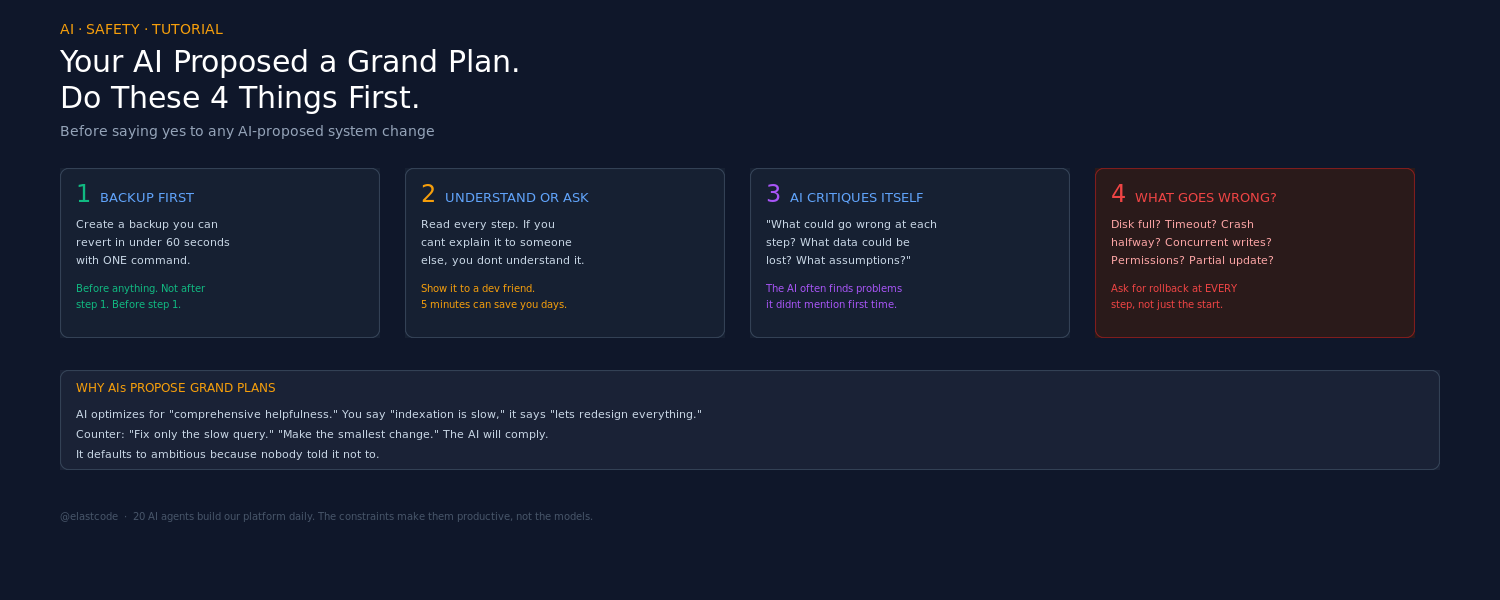
A practical guide to not letting an AI agent destroy your production system while trying to improve it
A friend messaged me yesterday. His AI coding assistant had proposed a grand project: rebuild the entire indexation system for his websites. New architecture, new data flow, new everything. The AI laid out a convincing plan with clear steps and reasonable-sounding justifications.
He said yes and ran it. It broke things.
This is not an article about AI being bad. I run 20 AI agents that build my platform daily. This is about a pattern I see constantly: an AI proposes something ambitious, the human approves it without doing four things first, and then spends hours or days recovering.
Here are the four things.
Step 1: Before anything else, make a backup you can revert in one minute
Not "back up your database." Not "push to git." A backup you can revert in under sixty seconds with one command.
The AI is about to touch your production system. Before it writes a single line, you need a snapshot of the current state that you can restore by typing one command. Not two commands. Not "restore from S3." One command, one minute, you're back to exactly where you were.
For a database:
cp mydb.sqlite mydb.sqlite.before_ai_indexation
# revert: cp mydb.sqlite.before_ai_indexation mydb.sqlite
For a codebase:
git stash  # or: git checkout -b backup-before-ai-plan
# revert: git stash pop  # or: git checkout main
For a server config:
cp -r /etc/nginx /etc/nginx.before_ai
# revert: cp -r /etc/nginx.before_ai /etc/nginx && nginx -s reload
The key word is before. Not "I'll back up after the first step." Before anything. The AI doesn't know what it doesn't know, and neither do you — that's the whole reason you're using AI. The backup is your safety net for the things neither of you anticipated.
Tell the AI to create this backup as part of the plan. Say: "Before any changes, create a backup I can revert with one command in under one minute. Show me the revert command." If the AI can't do this, the plan is not ready.
Step 2: Understand the plan, or find someone who does
The AI gave you a plan. Read it. If you understand it — every step, every consequence — move to step 3.
If you don't understand it, you have two options:
Option A: Ask the AI to explain it in simpler terms. "Explain this plan as if I'm not a developer. What does each step actually change? What will look different after?" A good AI will translate technical steps into observable outcomes. "After step 3, your website URLs will change from /blog/post-title to /posts/post-title" is something you can verify.
Option B: Show the plan to someone with technical expertise. Copy the AI's plan, send it to a developer friend, and ask: "Does this make sense? What am I missing?" This takes five minutes and can save you days. The AI is confident — that's how language models work. A human with experience will see the risks the AI glossed over.
The mistake my friend made: the AI's plan sounded reasonable, and "sounding reasonable" was treated as "being correct." These are not the same thing. An AI can generate a perfectly structured, logically coherent plan that destroys your data — because it doesn't know what your specific system depends on.
The rule: if you can't explain the plan to someone else, you don't understand it well enough to approve it.
Step 3: Ask the AI to analyze its own plan for problems
This is the step almost nobody does, and it's the most valuable one.
After the AI gives you the plan, say:
> "Now analyze this plan. What could go wrong at each step? What assumptions are you making? What data could be lost? What would be hard to reverse?"
The AI will often find problems in its own plan that it didn't mention the first time. This is not a bug — it's how these models work. The first response optimizes for answering your question. The self-critique response optimizes for finding flaws. They activate different reasoning patterns.
Specific prompts that work:
- "What assumptions does this plan make about my current system?"
- "Which step is the hardest to reverse if it goes wrong?"
- "What happens if the process crashes halfway through step 3?"
- "Is there any scenario where this plan causes data loss?"
- "What would a senior engineer criticize about this approach?"
You'll be surprised how often the AI says "Actually, step 4 could cause problems if..." — information it had access to the entire time but didn't volunteer until asked.
Step 4: Ask specifically what could go wrong
Step 3 is about the plan's internal logic. Step 4 is about the real world.
> "What could go wrong when we actually run this? Network failures, timeouts, disk space, permissions, concurrent users, partial updates?"
This forces the AI to think about execution, not just design. The plan might be logically perfect and still fail because:
- The database runs out of disk during re-indexation
- Another process writes to the same tables during migration
- A timeout kills the script halfway through
- File permissions prevent writing to the target directory
- The old index is deleted before the new one is verified
Ask for the rollback procedure at each step, not just at the beginning. "If step 3 fails, how do I get back to the state after step 2?" The AI should be able to answer this for every step. If it can't, the plan has gaps.
The checklist (print this)
Before approving any AI-proposed system change:
1. Backup exists? Can I revert everything in under 60 seconds with one command?
2. Do I understand it? Can I explain every step to someone else? If not, have I asked for help?
3. Has the AI critiqued itself? Have I asked it to find problems in its own plan?
4. Real-world failures? Have I asked what happens when things crash, timeout, or run concurrently?
If any answer is no, the plan is not ready. Tell the AI: "We're not ready yet. Address [the gap] first."
Why AI agents propose grand plans
Understanding this helps you calibrate your trust.
AI language models are trained to be helpful. When you say "my website indexation is slow," the AI doesn't say "add an index to one column and measure." It says "let me redesign your entire indexation architecture." Because redesigning everything is a more comprehensive answer, and the model was trained to prefer comprehensive answers.
This is not malice. It's not even a mistake in the model's terms. It's a misalignment between what the model optimizes for (comprehensive helpfulness) and what you need (the smallest change that fixes the problem).
Counter this by constraining the scope explicitly:
- "Fix only the slow query, don't change the schema"
- "Improve indexation without changing any URLs"
- "Make the smallest possible change that addresses this"
The AI will comply. It just defaults to ambitious because nobody told it not to.
What good AI collaboration looks like
I run 20 AI coding agents on my platform. They commit code daily. They find bugs, implement features, and write tests. They are enormously productive.
But every one of them operates under constraints:
- They work on copies, never on live data. Tests run against database copies, not production.
- They make incremental changes. One feature, one commit, one verification. Not "rewrite the system."
- They are reviewed. Every change is checked — by me, by the compiler, by the test suite, or by another AI.
- They report what they don't know. The discipline docs require agents to say "I'm not sure about this" rather than guess confidently.
The AI that proposed the grand indexation rewrite wasn't wrong to propose it. The gap was in the process around it. Backup, understand, critique, anticipate — then decide.
The meta-lesson
The four steps above are not really about AI. They're about any system change proposed by anyone — a contractor, a new hire, a consultant, or yourself at 2 AM. The difference with AI is speed: an AI can propose and execute a destructive plan in the time it takes you to make coffee. The safeguards have to be faster than the execution.
Make the backup before you start thinking about whether the plan is good. That way, when you discover it isn't, you're sixty seconds from recovery instead of sixty hours.
*I built the Elastic Platform — own compiler, own database, own protocol — and 20 AI agents build on it daily. The agents are productive because the constraints are right, not because the agents are infallible.*
*More articles: elastcode.com/downloads/articles.html*
*Follow: @elastcode*